Rebind
Program the gear you already own.
Remap keys, automate input, and build app-specific controls. The free Engine runs on your computer; optional Rebind Link adds physical USB output.
Two parts of one product
Luau runs in the host Engine in both modes. Software mode emits through operating-system input APIs; hardware mode sends output through Rebind Link as USB HID.
Rebind Engine
Free host-side software for remaps, macros, and application-aware input. Scripts can expose settings panels and connect to local tools or AI agents through HTTP, WebSocket, or MCP.
Core scripting supports Windows, macOS, and Linux. Screen, window, and clipboard capabilities vary by platform.
Install freeRebind Link
Optional hardware for physical USB keyboard and mouse output and supported mouse-movement transforms. Hardware capture and setup vary by platform.
Currently backordered. Pricing, availability, and device terms live on rebind.gg.
View Rebind LinkThe work behind Rebind
The software handles input behavior. The mechanical design handles board support, enclosure assembly, and the organization of the kit.
Application screenshot
Rebind Engine
Host-side scripting and an integrated editor. RebindGPT drafts scripts from a description; users review and test them before relying on them.
Current CAD geometry
Link enclosure
The current top and bottom shells, generated from the parametric case source. The neutral material shows geometry, not a proposed finish.
Current CAD geometry
Board support and closure
The lower shell's board supports, locating features, and screwless closure geometry, rendered with the same camera and material.
Current CAD geometry
Layered packaging insert
Four layers form the card recess, device cavity, and cable pocket. This exploded view is generated from the current packaging CAD.
CAD views show current source geometry at illustrative scales. They are not material or finish samples.
Preparing each Link board
The US Input Manufacturing Terminal guides firmware flashing, device enrollment, and verification. Results are recorded by batch, and failed units follow a rework path.
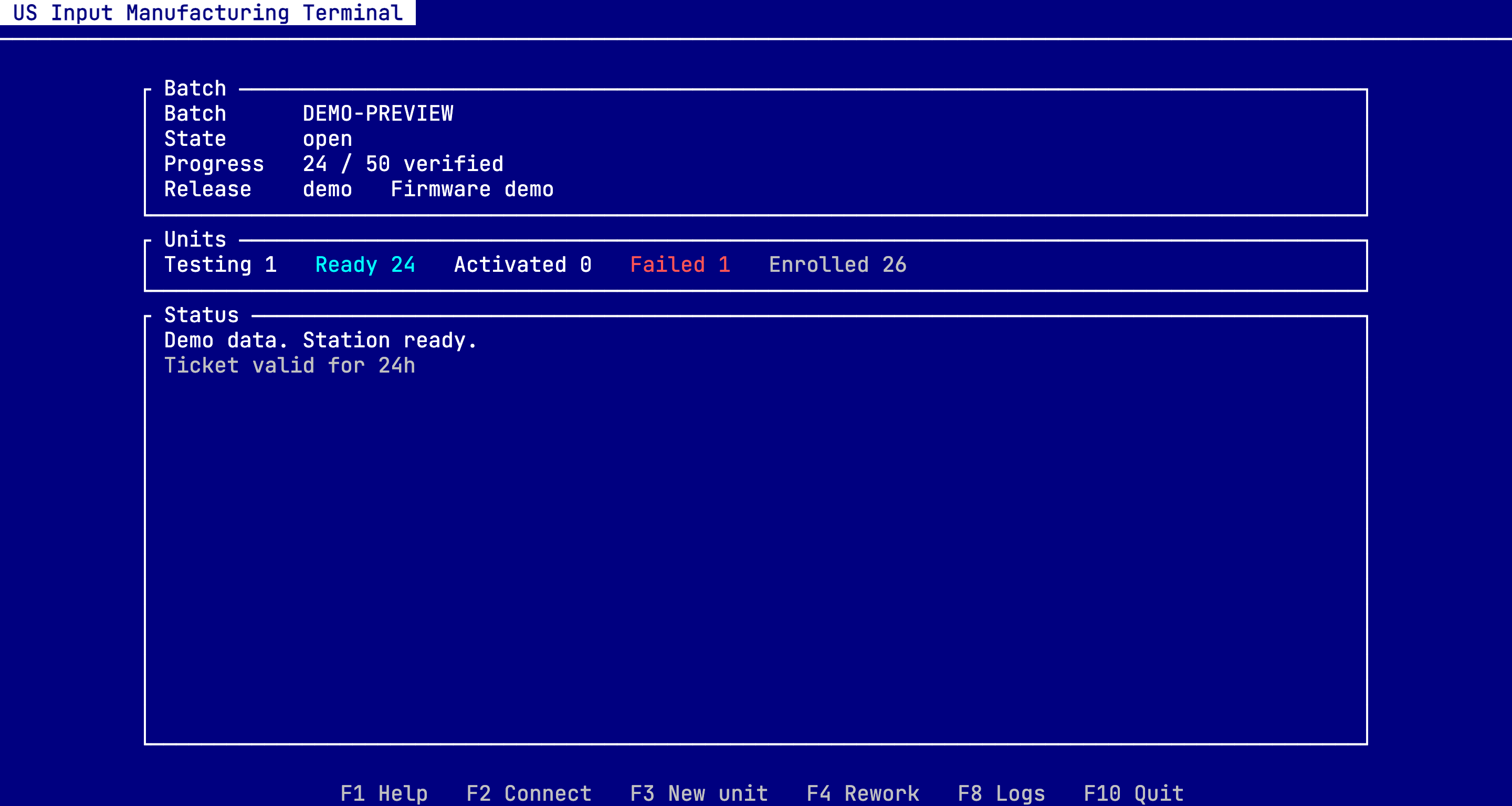
Verify firmware
Check the version and digest against the signed release.
Flash and enroll
Program the Link board and provision its device identity.
Reconnect and check
Verify the same unit after a physical disconnect and reconnect.
Record the result
Record the verified unit or return it to the rework flow.
See how the kit opens
The kraft-box mockup brings the artwork and opening sequence together. The current layered insert shown in the gallery organizes the card, device, and cable inside.
Packaging concept, adapted from the CAD mockup. Drag horizontally to turn, or use the controls. The box is shown without its insert so the artwork and lid movement remain visible.
Development concept. Physical samples determine final fit, materials, and kit contents.